

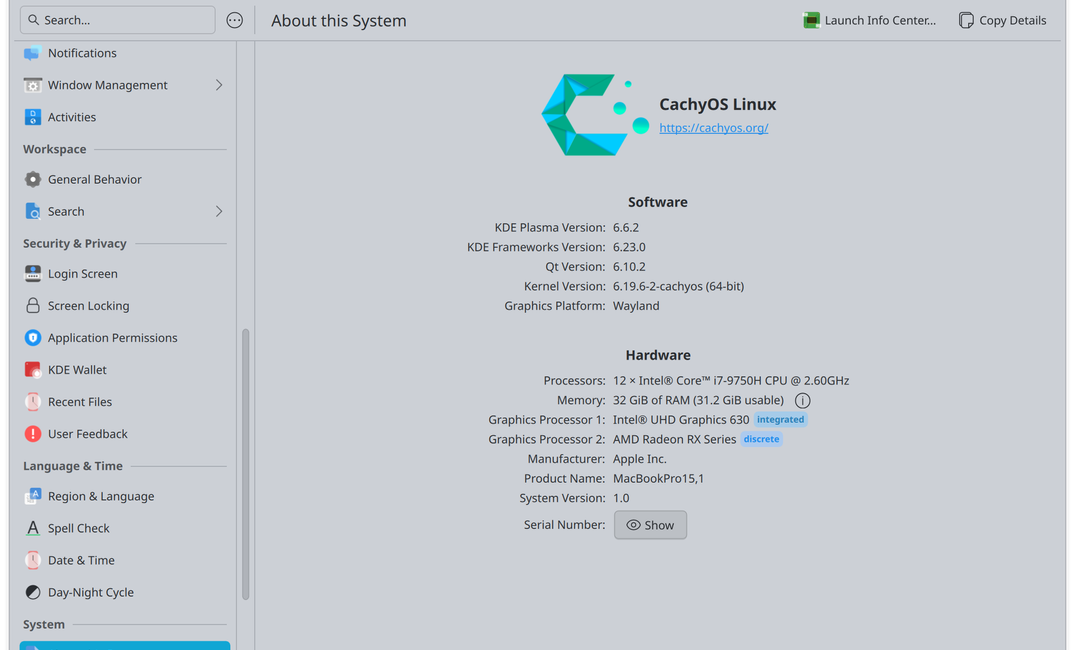
I have an older MacBook Pro (2019, Intel i7-9750H, 32G) which in the year 2026 is not exactly a champ at running macOS, while also being locked out of running the latest versions. (The only Intel Mac that runs macOS 26 Tahoe being the Mac Pro)
It's a nice machine and I didn't want to discard it, so I went with Linux, and settled on CachyOS. I won't go into all the reasons, but it's a super fast distro built on Arch and it's turned a circa-2019 MacBook Pro into something that feels faster at times than my M4 MacBook Pro from 2025.
The fine folks over at Cachy have a whole page on installing on a MacBook with T2, especially if you want to dual boot with macOS. Basically, most things work out of the box after installation. But installation takes a bit of work, as they can't legally use Apple's own WiFi drivers to enable WiFi during installation. Short version is you can ignore a lot of it if you use a wired Ethernet connection, external mouse and keyboard to setup, and don't preserve a macOS partition. This didn't matter so much to me as it ran macOS like crap at this point anyway. (Also, I keep a bootable macOS USB around for situations where I may need it.) Do make sure you have Secure Boot turned off. Otherwise, you'll want to follow instructions to use WiFi and the keyboard/touchpad on the Mac.
Either way, do follow up with the suggestions on the t2linux wiki about further options.
To make this a TL;DR as possible, I'm going to list a bunch of issues/suggestions here, which you may or may not run into while doing your own installation. It's not a step-by-step guide, those exist like those above, but notes specific for install CachyOS on your Mac hardware.
Bootloaders
During installation of Cachy, you'll be given options for bootloaders. I believe it defaults to Limine at this point, which is the most modern, Grub is another good option. See caveats below.
Selecting Limine initially is probably the way to go even if you change it later as it makes the largest boot partition of any (I believe), otherwise if you were to, for example, go from Grub to Limine, you'll need to resize your boot partition which can be a bit of a pain.
Limine
Modern, theme-able, works well with snapshots. There is one caveat I've noticed: it does not enable the iGPU on machines which feature a discrete GPU. My 2019 example has both the iGPU on the Intel i-9750H as well as a discrete AMD RX GPU, and having both available saves on both heat and battery. Otherwise, the machine will favor the dGPU, which I've also found causes problem with sleep.
The workaround to this is to use Grub (which does not seem to have this problem) or chainload a small efi file prior to Limine which enables the iGPU. (Let me know if there's a desire for specific instructions on this.)
Grub
Classic, also somewhat extensible and themed nicely. Works with snapshots. Can be finicky with certain setups.
Somehow this enables the iGPU? I really couldn't find much information on this online so don't know why this is the case unless it's something the Cachy installer is doing. I believe Grub can be built with a module which enables the iGPU.
systemd-boot
systemd's own boot manager, simple, no frills, does not integrate with snapshots in the boot menu.
rEFind
Never used, so don't know. Looks like butt. (Sorry, rEFind likers.)
Discrete GPUs and integrated GPUs (fixing suspend)
If your machine offers both, for both stability and battery life, making the iGPU your primary GPU is a good idea. This allows the OS to use the dGPU only when it needs the extra oomph – like playing games.
Make a new file:
echo "# Enable the iGPU by default if present
options apple-gmux force_igd=y" > /etc/modprobe.d/apple-gmux.conf
/etc/modprobe.d/apple-gnux.conf
Add or modify Linux boot options. This is in your /boot/limine.conf file or /etc/default/grub if using those bootloaders. See instructions for others. If using Grub, remember to rebuild with grub-mkconfig -o /boot/grub/grub.cfg.
amdgpu.runtime_pm=0 amdgpu.runpm=0 amdgpu.gpu_recovery=1 amdgpu.gfx_off=0 nvme_load=YES reboot=efi zswap.enabled=0 mem_sleep_default=s2idle splash loglevel=3 intel_iommu=on iommu=pt pcie_ports=compat i915.enable_guc=2 /boot/limine.conf
More Soon?
Will updated this page with other findings as I go. I did this install a few months ago, so I've learned a lot, but I'm a chronic tinkier, so always looking to optimize and improve.
Also put CachyOS on an Surface 7 Pro and will have a piece on that soon. There's some issues there with the touchscreen and pen functions which I'll cover.